

If AI is building your game, you still need to understand what it is building. This series explains the key concepts a few at a time, starting with the shape of a 3D model.
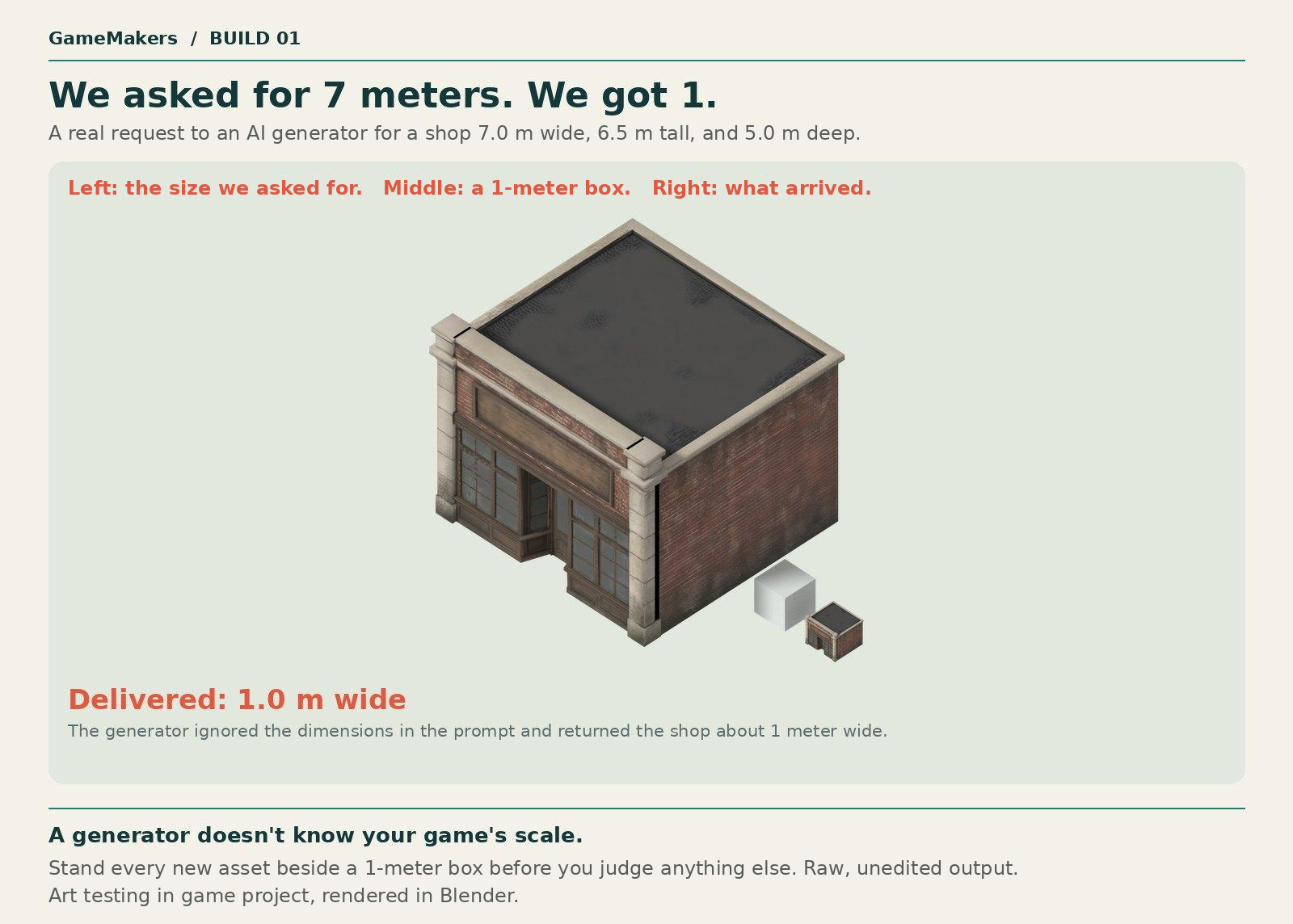
We asked an AI tool for a 3D model of a shop, 7 meters wide. In the tool’s preview, it looked great. In our game, it was 1 meter wide and half-buried in the floor.
Nothing in the preview warned us. We caught it because we knew what to check. By the end of this post, you will too.
What this post covers
This post covers the shape of a 3D model, in three concepts:
Mesh: the shape of a 3D object, with no color or surface detail.
Triangles: the small flat pieces every mesh is built from.
Size and pivot: how big a model is in meters, and the one point your game holds it by.
Then one prompt checks all three, and four real mistakes show each concept at work.
Why you need the concepts
Vibe coding means building software by describing what you want and letting an AI write it. More and more games are being made this way, including their 3D art.
It works well until something looks wrong. Then you have two options. You can type “make it better” and hope. Or you can understand what the AI made, see where it went wrong, and say so.
The second option needs concepts. You can’t check what you don’t understand, and you can’t correct what you can’t name. You don’t have to do the artist’s job or the programmer’s job. You do have to know what they are working with.
Each post in this series explains a small set of concepts in plain language. Then it shows those concepts at work in a few real mistakes. The mistakes are there to make the concepts stick.
Who this is for
You know games. You have never opened a 3D art program. You are using AI to make 3D art for a game, or you are about to.
The examples come from an isometric-style mobile game. The camera looks down at the world from a fixed angle, like a classic isometric game, but it is a regular perspective camera, so things farther away look slightly smaller. Episode 4 explains the difference. The examples are real files or tests from a game we are building.
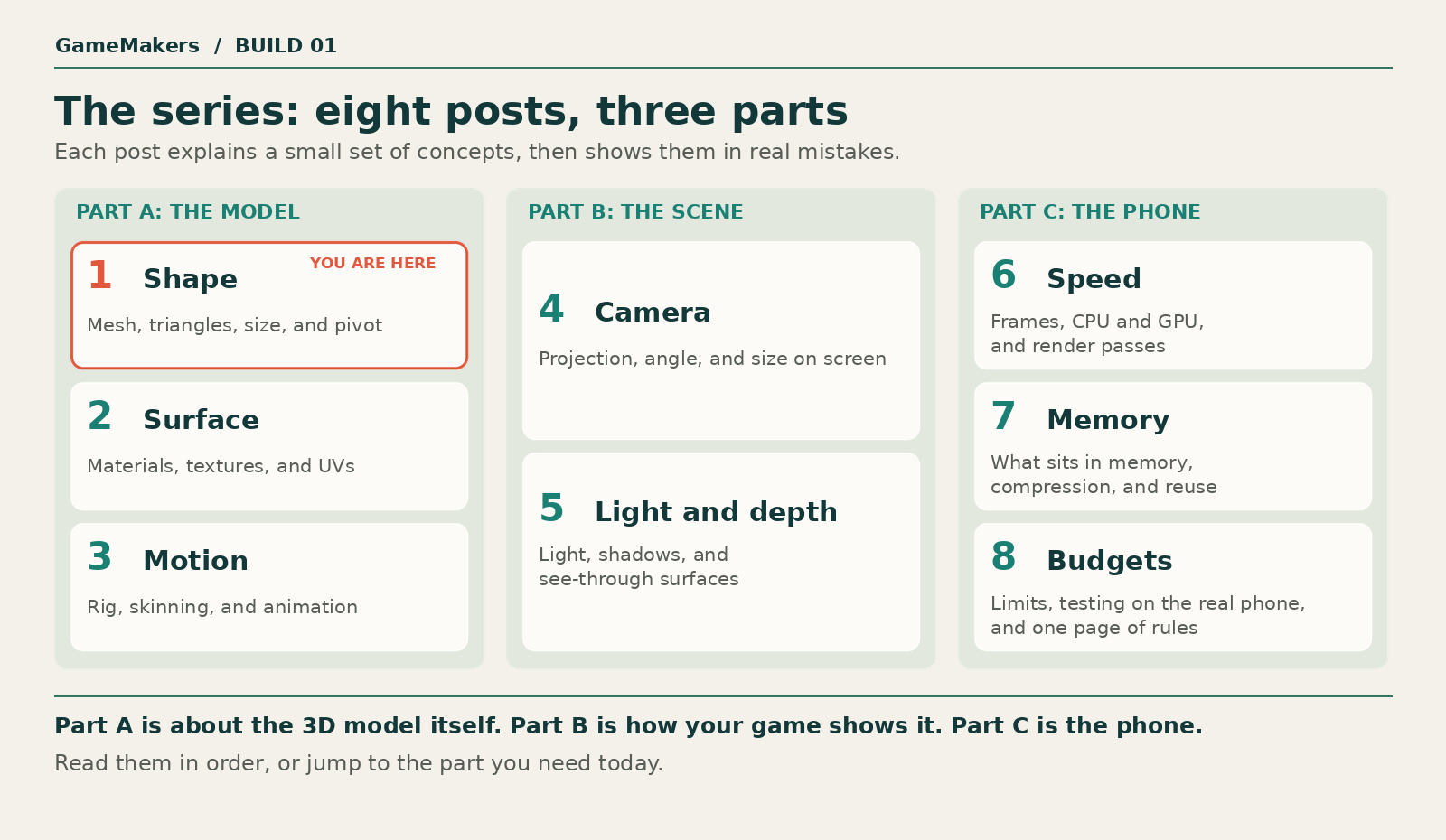
The series
Where a 3D model comes from
Before the concepts, five names. They come up in every post.
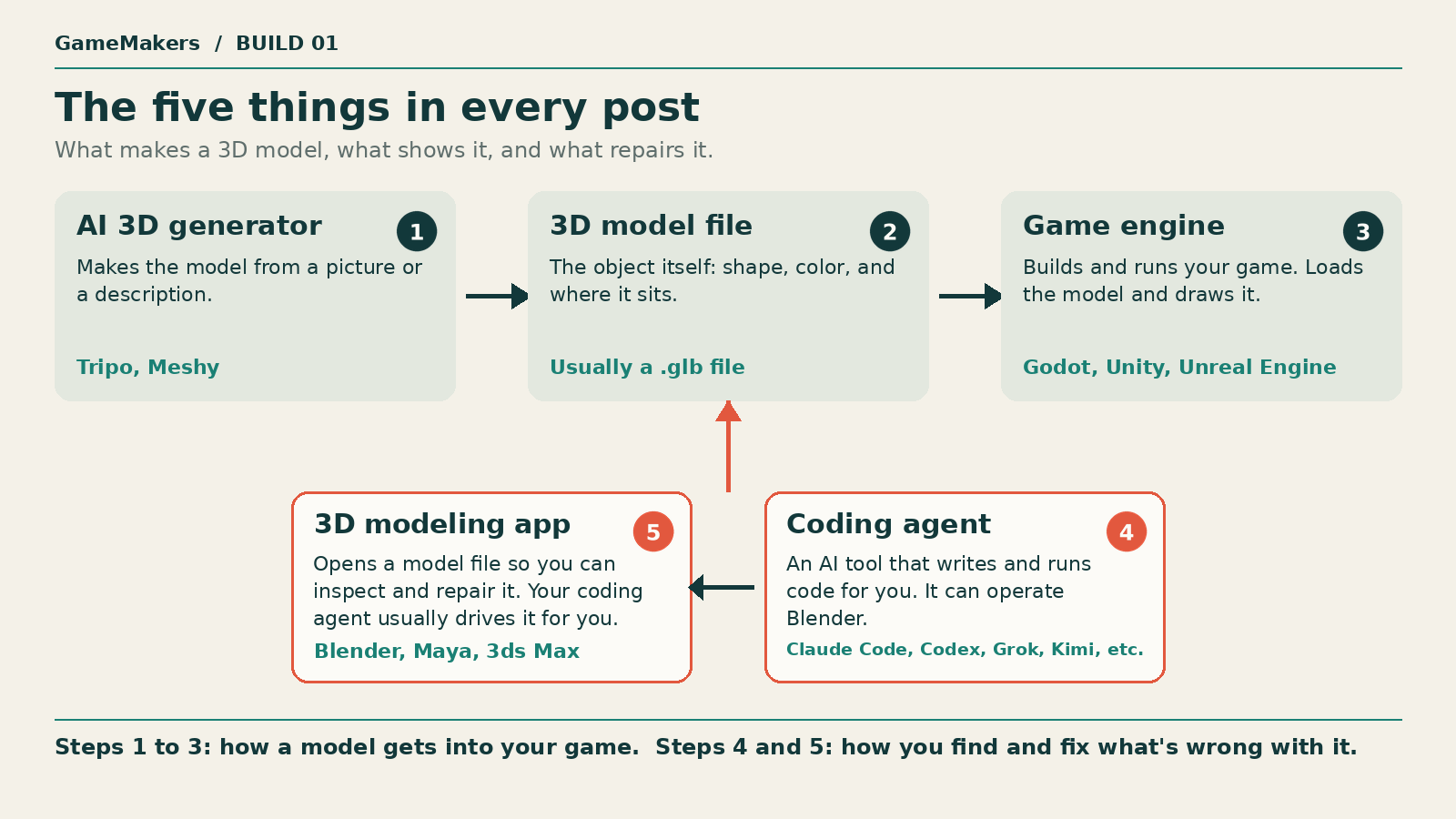
AI 3D generator: a tool that makes a 3D model from a picture or a description. Tripo and Meshy are two examples. It is not your game engine.
3D model file: a file that describes a 3D object. It is usually a .glb file. You will also hear it called an asset.
Game engine: the program your game is built in and runs in. Godot, Unity, and Unreal Engine are examples. The engine loads your models and draws them on screen.
Coding agent: an AI tool that writes and runs code for you, such as Claude Code, Codex, Grok, or Kimi. It can operate Blender for you.
3D modeling app: a program for looking at and repairing 3D models, such as Blender, Maya, or 3ds Max. A coding agent can run it for you, so you rarely open it yourself.
Concept 1: Mesh
In one line: a mesh is the shape of a 3D object, and nothing else.
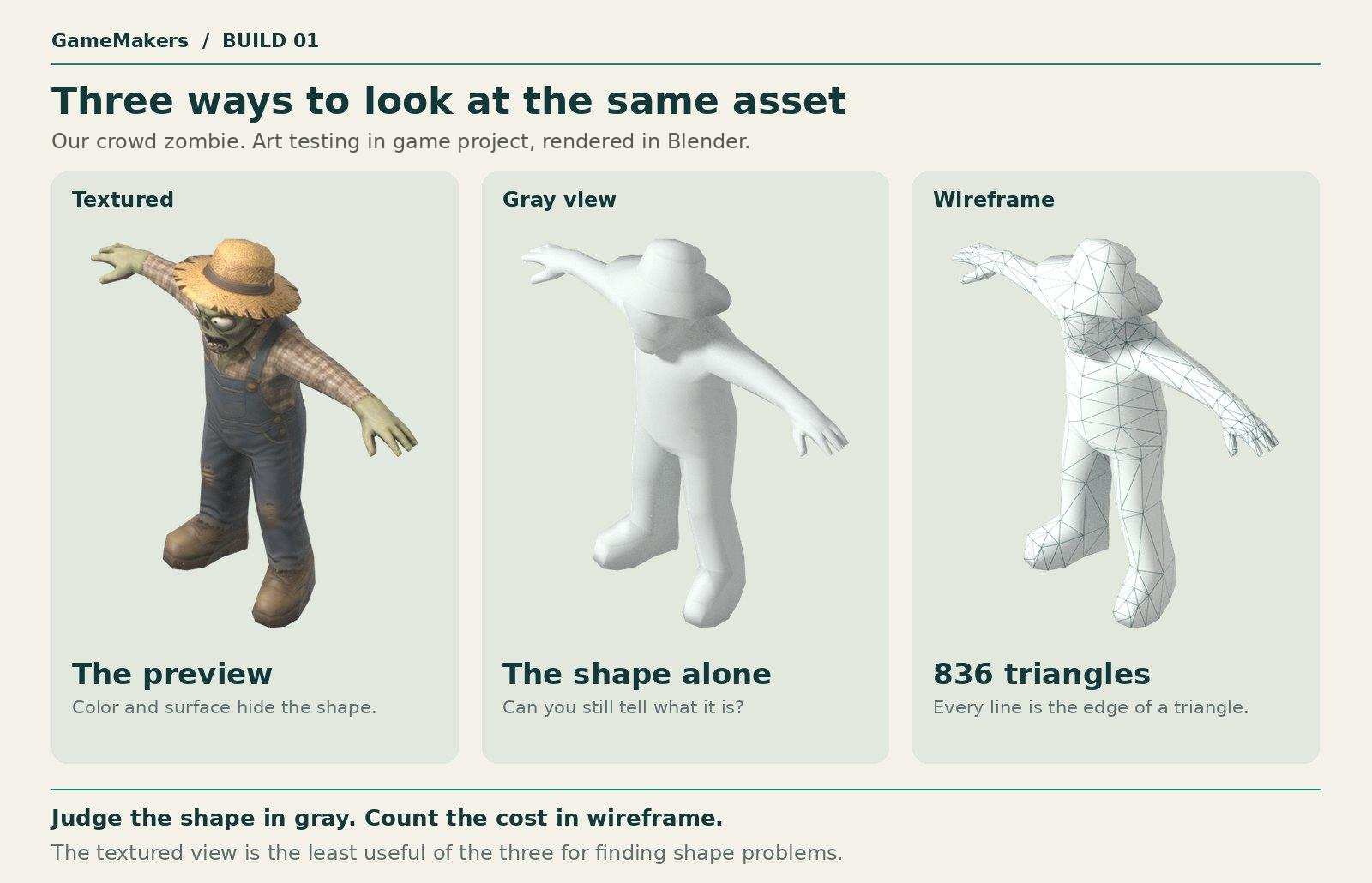
A 3D model has layers. The shape is the bottom layer. Color and surface detail are painted on top of it, and we cover those in the next post. Take the paint away and what is left is the mesh.
Two facts about a mesh matter later in this post:
A mesh is a shell. It is a thin surface with nothing inside, like a papier-mâché figure. If part of the surface is missing, you can see into it.
A mesh can be one piece or many. A truck might be a single shell, or a body with four separate wheels pushed into it.
How to see it: look at the model in gray view, which hides the colors. Every engine and 3D program can do this.
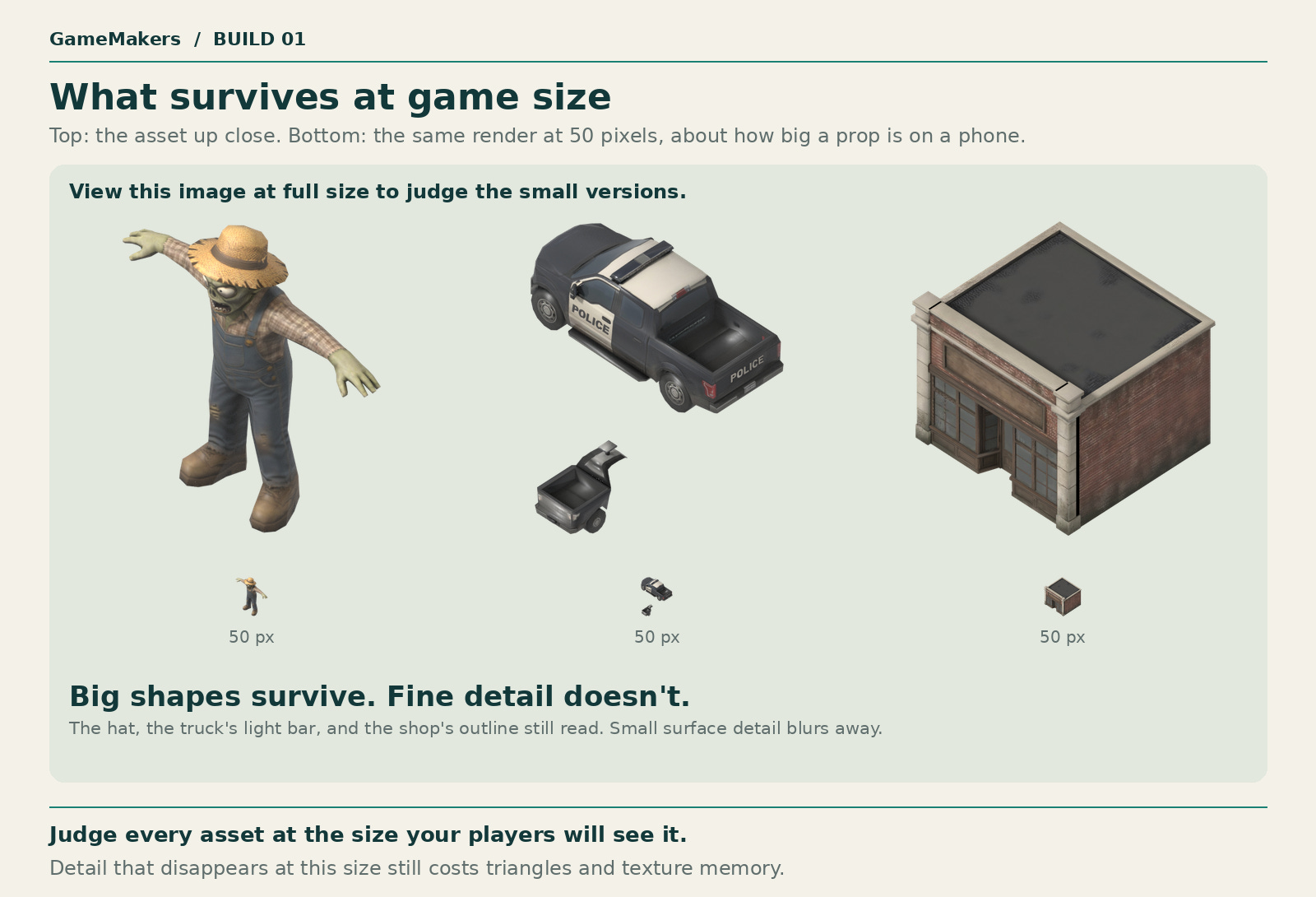
Why it matters: in a mobile game, your models are small on screen. Players recognize them by outline long before they notice color. If the gray shape is hard to read, paint won’t fix it.
Concept 2: Triangles
In one line: every mesh is built from small flat triangles.
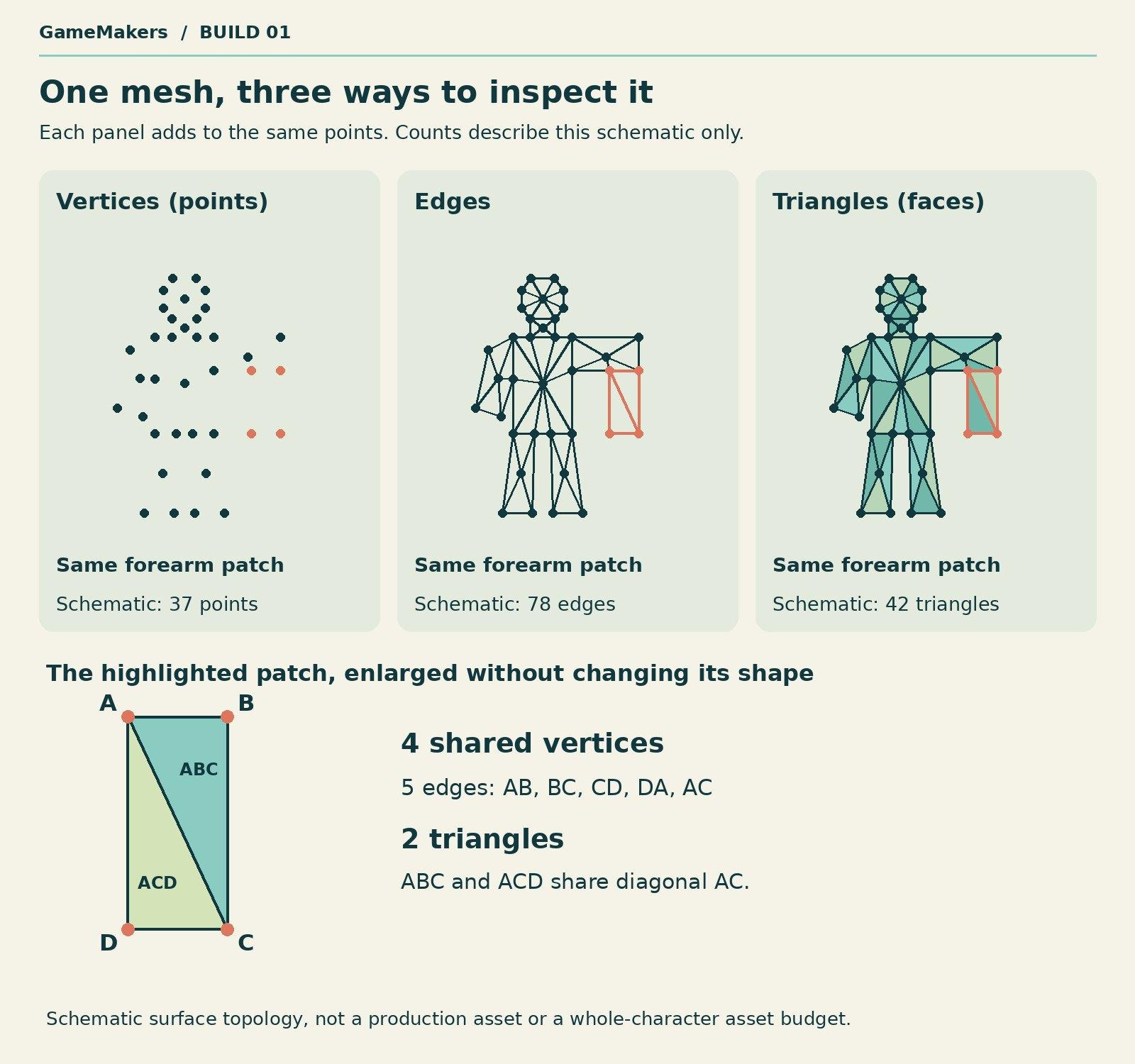
A computer can’t store a smooth shape directly. It stores a set of points in space, joins them with straight lines, and fills the gaps with flat triangles. The points are called vertices, the lines are called edges, and each flat triangle is called a face. Enough small triangles together look like a curved surface.
Three facts about triangles matter later:
Flat needs few, curved needs many. The flat side of a box needs two triangles. A round barrel needs dozens.
Every triangle costs something. Your phone redraws every triangle of every model on screen many times a second, whether or not the player can see the detail. How much that matters depends on the game. In ours, the number of enemies on screen turned out to cost more than the triangles in each one.
Every triangle has a front and a back. The order its three corners are stored in, called its winding, decides which side is the front. To save work, game engines draw only the front. A triangle facing the wrong way looks like a hole.
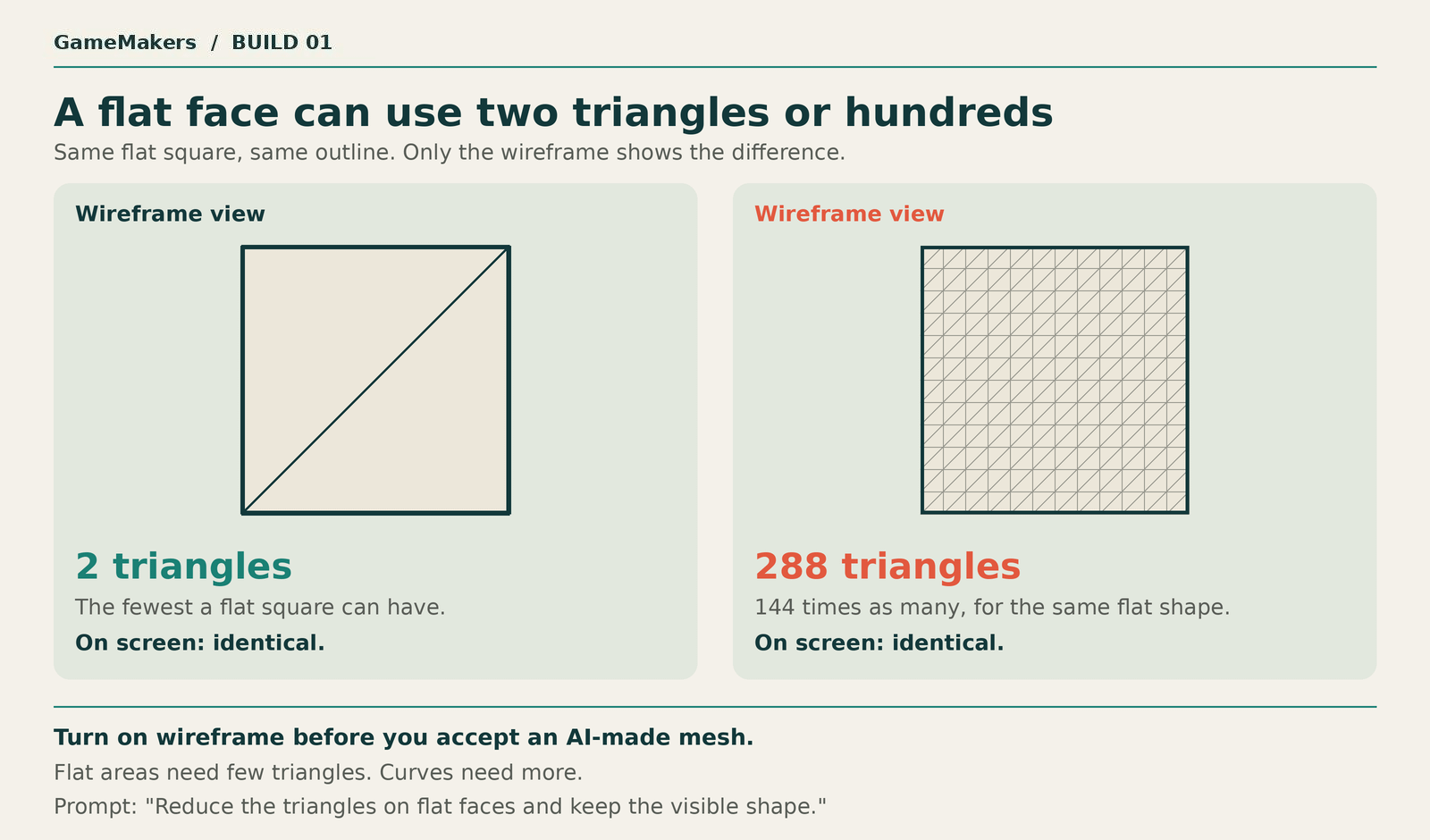
How to see it: look at the model in wireframe view, which draws the triangles as lines. Your engine or Blender can also show the triangle count as a number.
Why it matters: every model has a budget. In our game, a hero gets 3,000 to 6,000 triangles. A crowd enemy gets far fewer, because up to a hundred of them are on screen at once. Our common zombie has 836 triangles.
Concept 3: Size and pivot
In one line: every model has a size in real units, and one point the game holds it by.
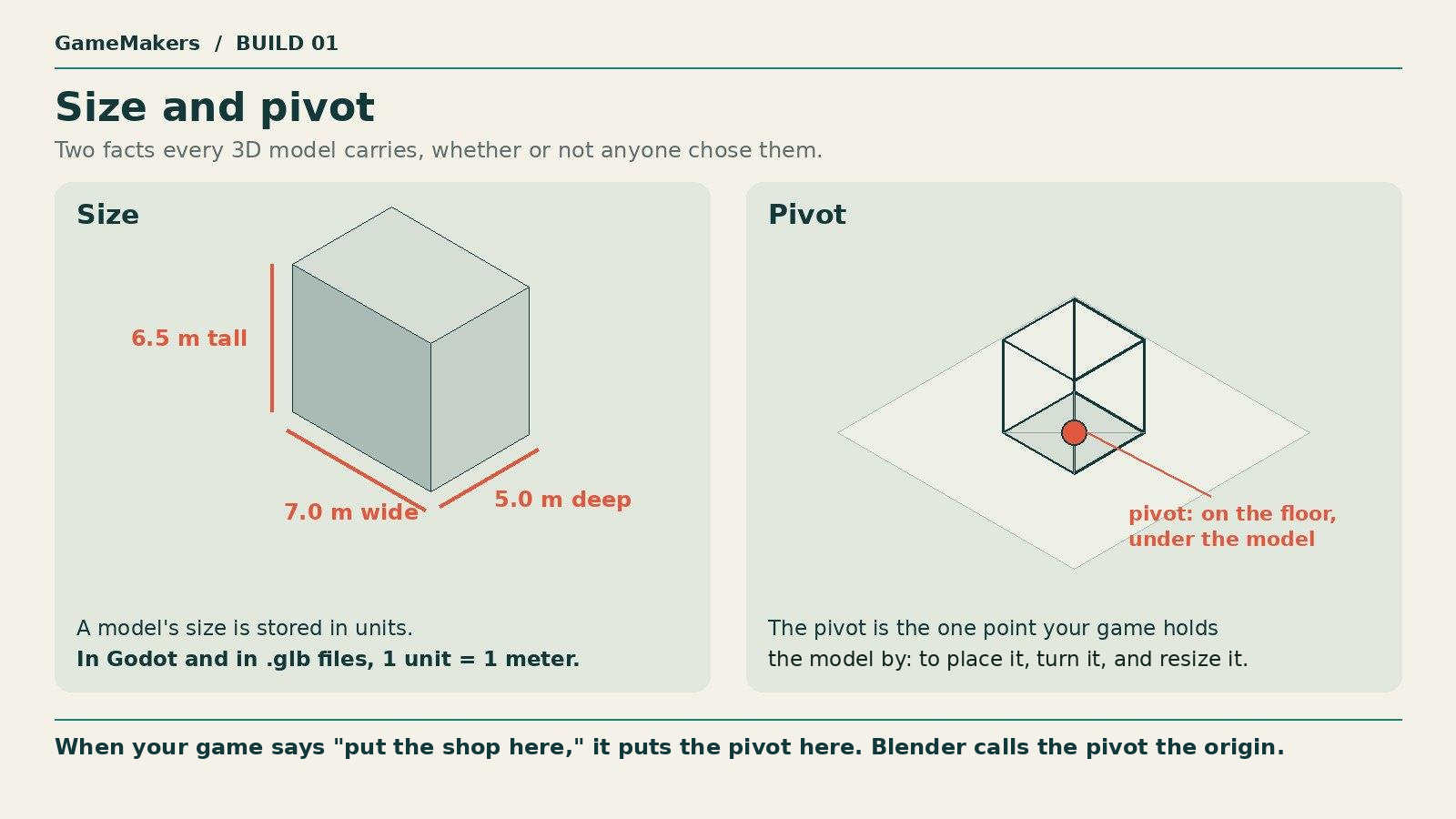
Size. A model’s width, height, and depth are stored as numbers. In Godot, and in .glb files, one unit is one meter. A model that is 1 unit wide is 1 meter wide in your game.
Pivot. The pivot is the single point your game uses to place a model, turn it, and resize it. When the game puts a shop at a spot on the ground, it puts the shop’s pivot at that spot. Blender calls this point the origin.
How to see it: stand the model next to a plain 1-meter box in your engine. Select the model, and the engine shows a small marker at its pivot.
Why it matters: an AI generator doesn’t know how big anything in your game is, or where the floor is. It will still give the model a size and a pivot, and in our tests they were often wrong.
One prompt that checks all three
You don’t have to open Blender to check a model. A coding agent can measure it for you. This prompt changes nothing in the file:
“Using Blender in background mode, open shop.glb and tell me: how many separate pieces the mesh has, how many triangles it has, how many faces point inward or border a hole, its width, height, and depth in meters, and where its pivot is compared with its lowest point. Merge duplicate points before counting pieces. Show me the script you ran and its output. Do not change the file.”
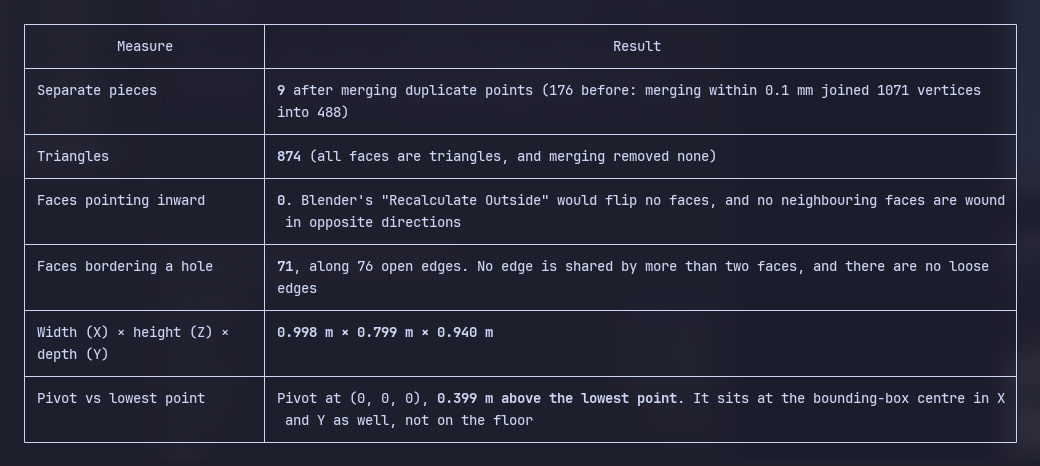
The answer comes back in about a minute as a short table. Each row belongs to a concept you now know.
Four mistakes, and the concept behind each
These are real files from our project tests. All four looked fine in the generator’s preview. A preview shows the model on its own, framed to fill the window, with no floor and nothing beside it. A 1-meter shop and a 7-meter shop look the same there. Judge a model in your engine, at the size it appears in your game.
Mistake 1: the shop that came back 1 meter wide
Concept: size.
This is the shop from the top of the post. We wrote “7.0 meters wide” in the description we gave the generator. It returned a model 1.0 meter wide.
Why it happened: the generator we used treated the words in our description as a suggestion. It followed its own settings much more reliably. The same request set a triangle limit of 1,000 through a setting, and the shop came back with 874.
What to tell the AI: the shape is close enough, and the size is wrong, so this is a repair job for the coding agent. Scaling fixes one measurement. If the proportions are wrong too, go back to the generator. When we ran this prompt, the coding agent warned us about the next mistake before we asked.
“Scale shop.glb so it is 7.0 meters wide, keeping its proportions. Apply the change to the model itself and save it as a new file. Tell me the final width, height, and depth.”
Mistake 2: the shop that sank into the floor
Concept: pivot.
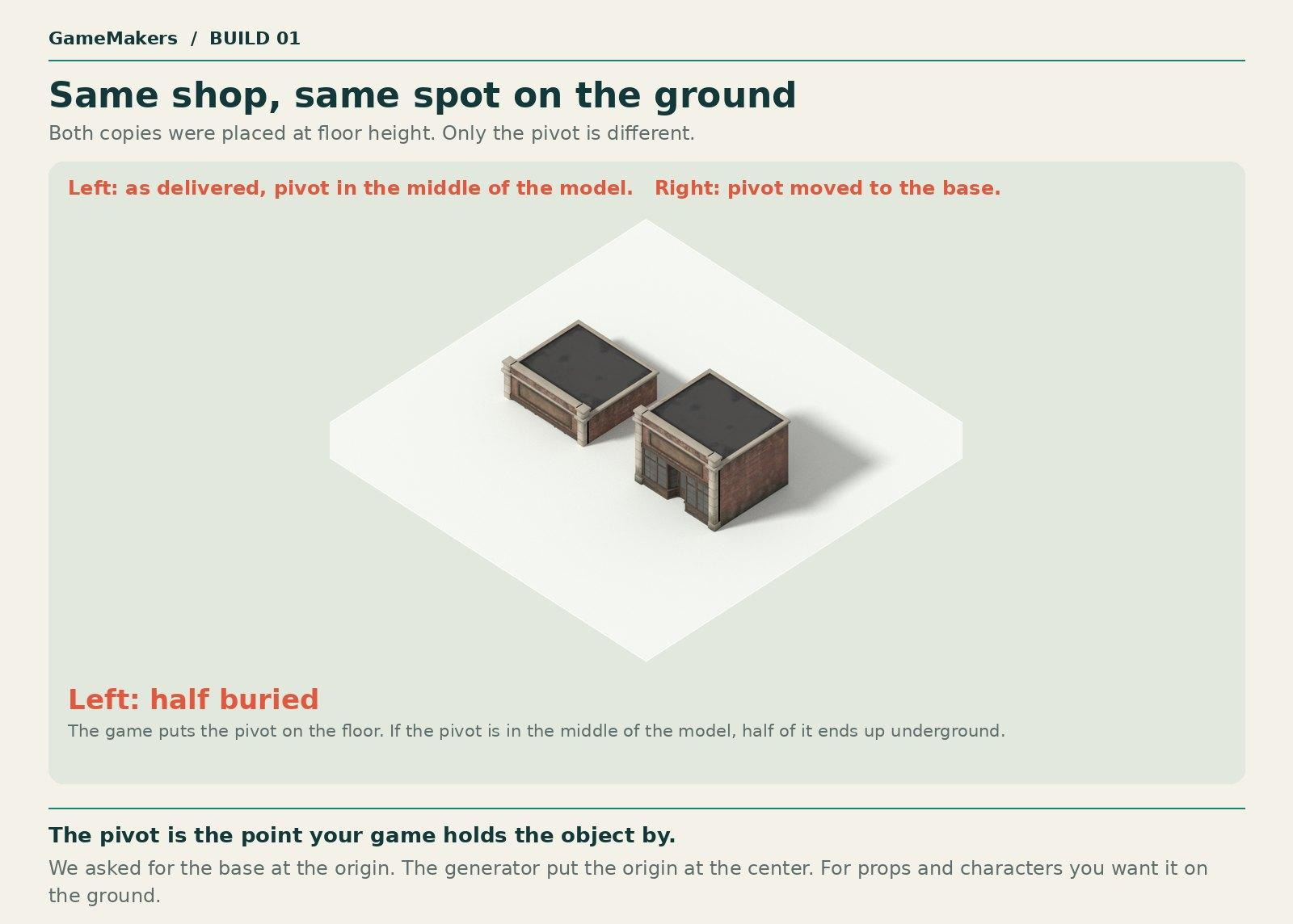
We asked for the pivot at the base of the building. The generator put it in the middle. When the game placed the shop on the floor, it placed the middle of the shop on the floor, and the bottom half went underground.
What to tell the AI: another repair job for the coding agent.
“Move shop.glb’s pivot to floor level, centered under the model. Save it as a new file. Tell me how far the pivot is above the lowest point of the model. It should be zero.”
Mistake 3: stray pieces and missing surfaces
Concepts: mesh and triangles.
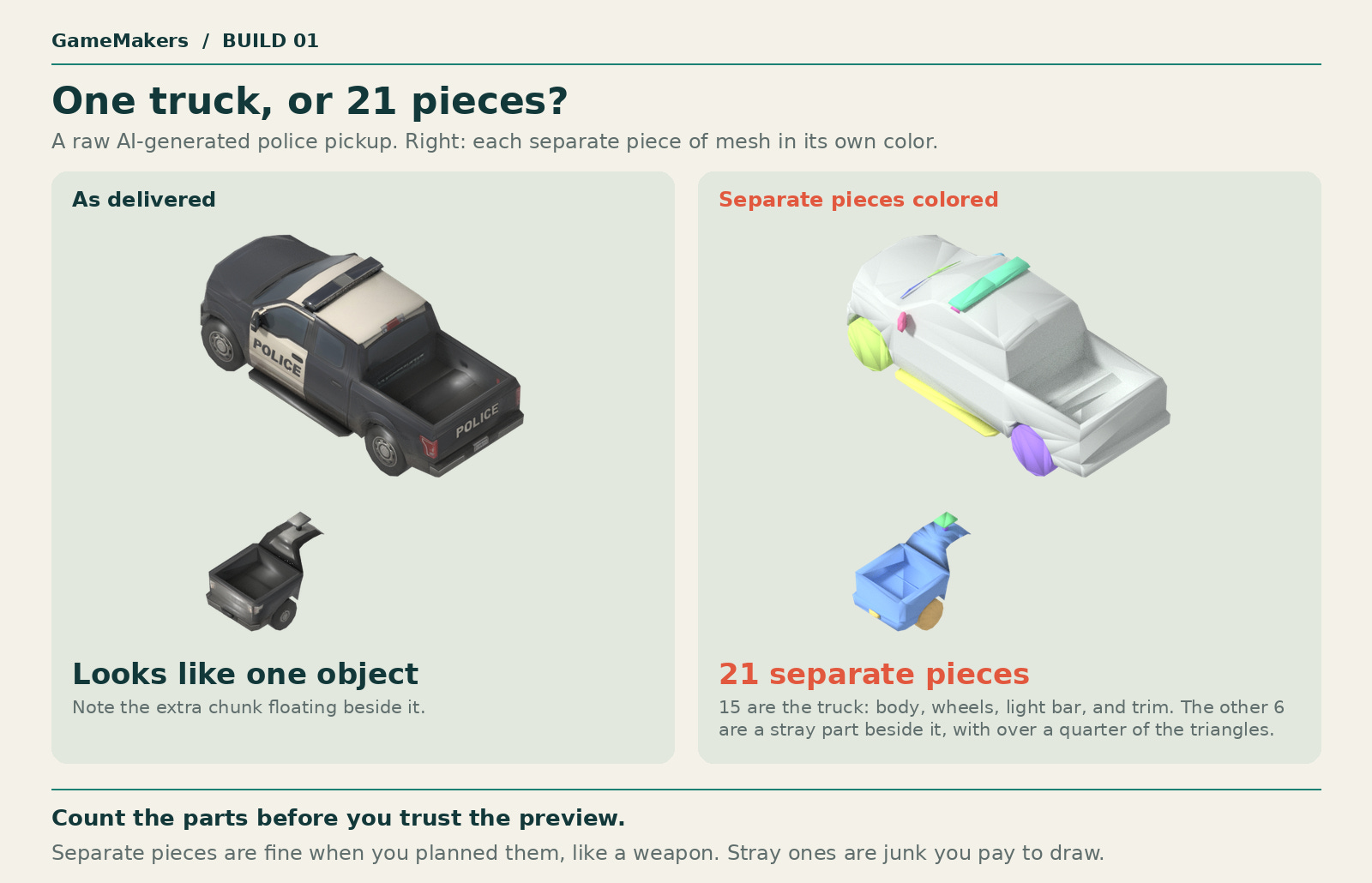
In the preview, this looked like one truck. Its mesh is 21 separate shells. Fifteen of them are the truck: the body, the wheels, the light bar, and strips of trim, pushed together. That is normal. The other six form a stray part that floats beside it. Those six hold 258 of the model’s 922 triangles, more than a quarter, spent on something that isn’t part of the truck.
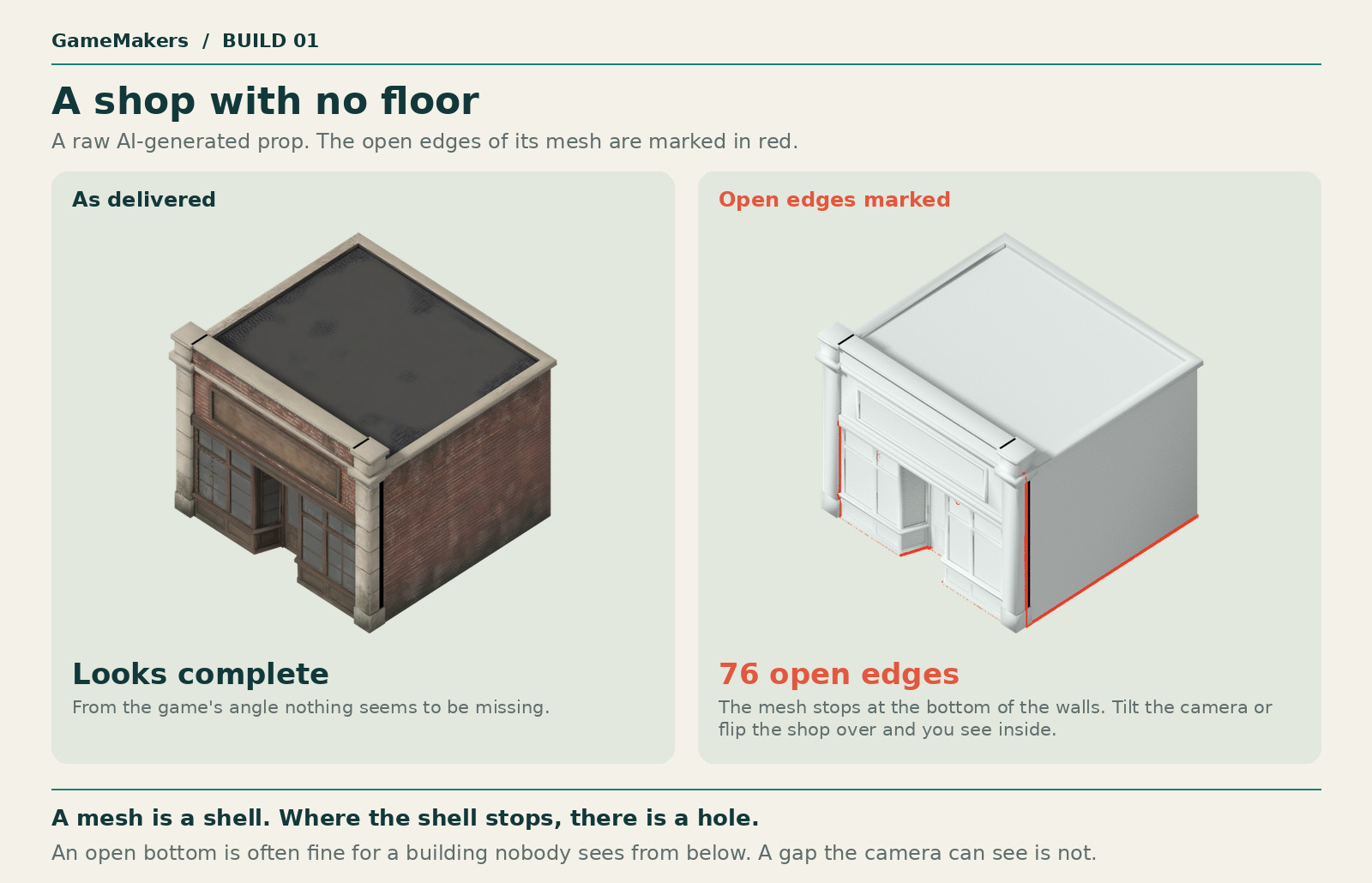
The shop has a different fault. It is an open shell with no floor. An open edge is an edge with a triangle on only one side, so it marks the rim of a hole. This shop has 76 of them, all along the bottom of its walls.
Not every gap needs fixing. Nobody will see under the shop. A gap the camera can see does need fixing.
What to tell the AI: the coding agent can find stray pieces and remove them. Ask it to list them first. Our first version of this prompt said to delete any piece that doesn’t touch the body, and the agent pointed out that this would delete the wheels.
“In pickup.glb, find any piece or group of pieces that sits clearly apart from the main model. List them with their size and their distance from the model, and wait for me to confirm before deleting anything. Keep parts that sit against the body, such as wheels. Then make every face point outward and fill any holes. Save it as a new file. Tell me how many pieces you deleted and how many faces you flipped.”
Mistake 4: the model that is heavier than it looks
Concept: triangles.
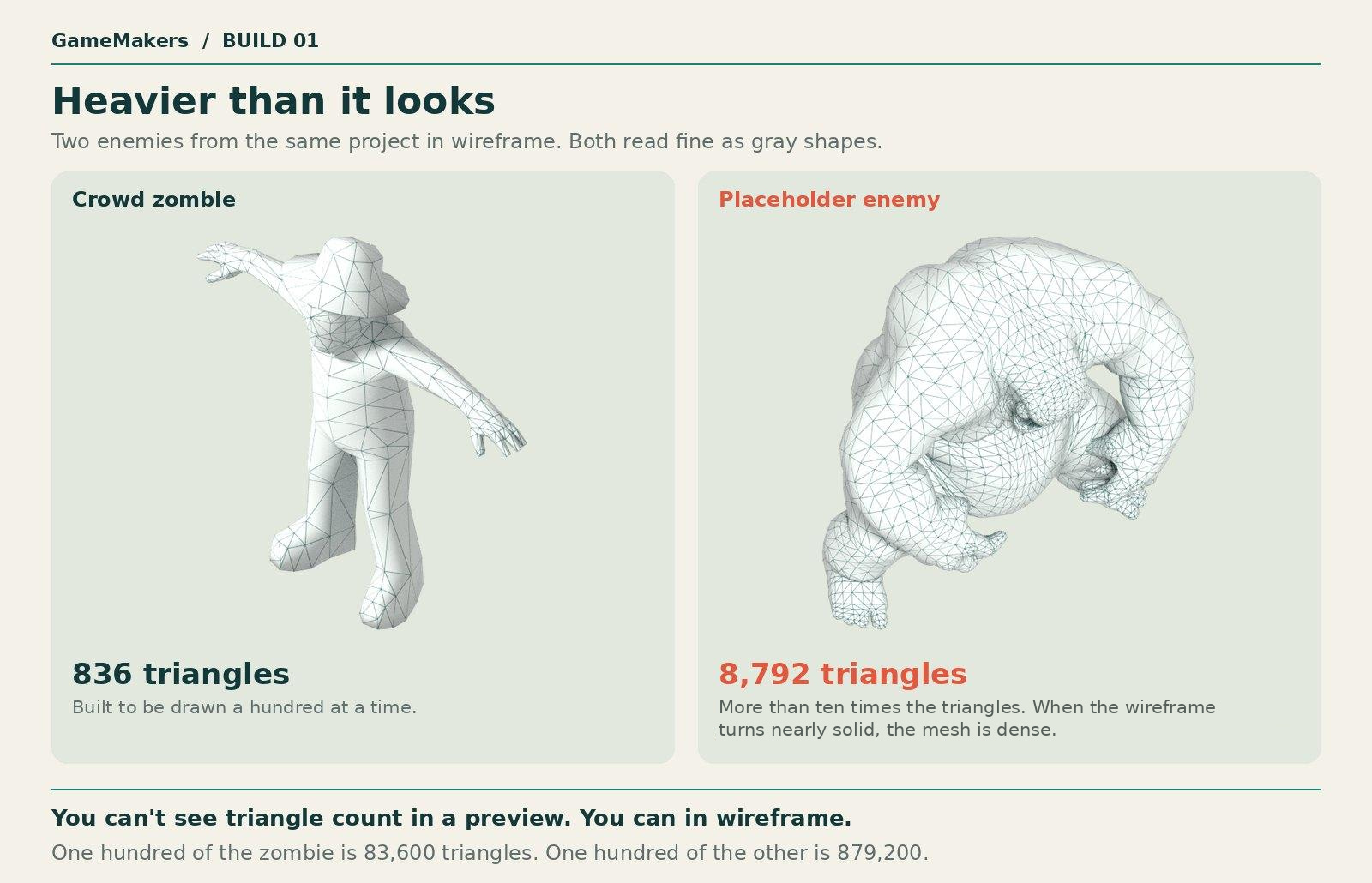
Our main hero has 9,750 triangles. The budget for a hero is 6,000. You can’t see that by looking at the model. You find it by counting.
The picture shows why looking isn’t enough. In gray view, these two test enemies seem equally detailed. In wireframe, the one on the right is almost solid with lines. It has 8,792 triangles, and the zombie has 836. It is a placeholder we always planned to replace, but it shows what a dense mesh looks like. One heavy hero is survivable. The budget exists because the same slip on a crowd enemy is multiplied by a hundred.
What to tell the AI: start with the generator. Most have a setting for the number of triangles, and it works better than asking in words. If you already have the file, the coding agent can reduce it. Afterward, look at the small parts. They break first.
“Reduce enemy.glb to about [N] triangles while keeping its outline. Save it as a new file. Then show me the old and new versions side by side in gray view at the size they appear in my game.”
What to tell your AI
Each mistake went the same way. We saw something wrong, named the concept behind it, measured it, and told the AI exactly what to change. The card and the list below lay out those steps for each problem.
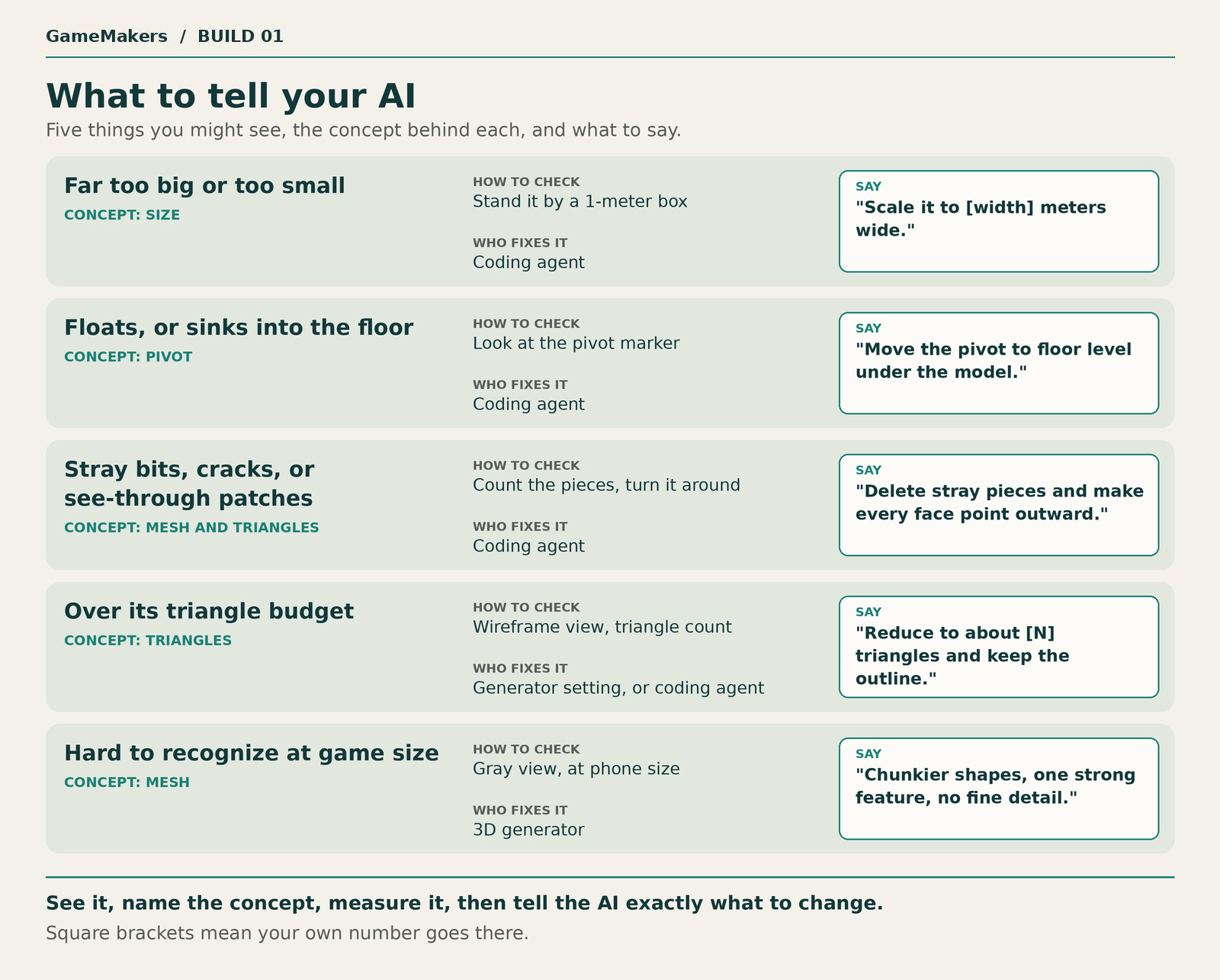
Far too big or too small. Concept: size. Check: stand it by a 1-meter box. Who fixes it: coding agent. Say: “Scale it to [width] meters wide.”
Floats, or sinks into the floor. Concept: pivot. Check: look at the pivot marker. Who fixes it: coding agent. Say: “Move the pivot to floor level under the model.”
Stray bits, cracks, or see-through patches. Concepts: mesh and triangles. Check: count the pieces and turn the model around. Who fixes it: coding agent. Say: “Delete stray pieces and make every face point outward.”
Over its triangle budget. Concept: triangles. Check: wireframe view and the triangle count. Who fixes it: the 3D generator’s triangle setting, or the coding agent. Say: “Reduce to about [N] triangles and keep the outline.”
Hard to recognize at game size. Concept: mesh. Check: gray view, at the size it appears on a phone. Who fixes it: 3D generator. Say: “Chunkier shapes, one strong feature, no fine detail.”
The three concepts again
Mesh: the shape of a model. A thin shell, in one piece or many.
Triangles: what the shell is built from. Each one costs something and has a front and a back.
Size and pivot: how big the model is in meters, and the point your game holds it by.
When an AI hands you a 3D model, those are the first things to check.
Next up
Next is episode 2: the surface: materials, textures, and how a flat picture gets wrapped around a mesh.
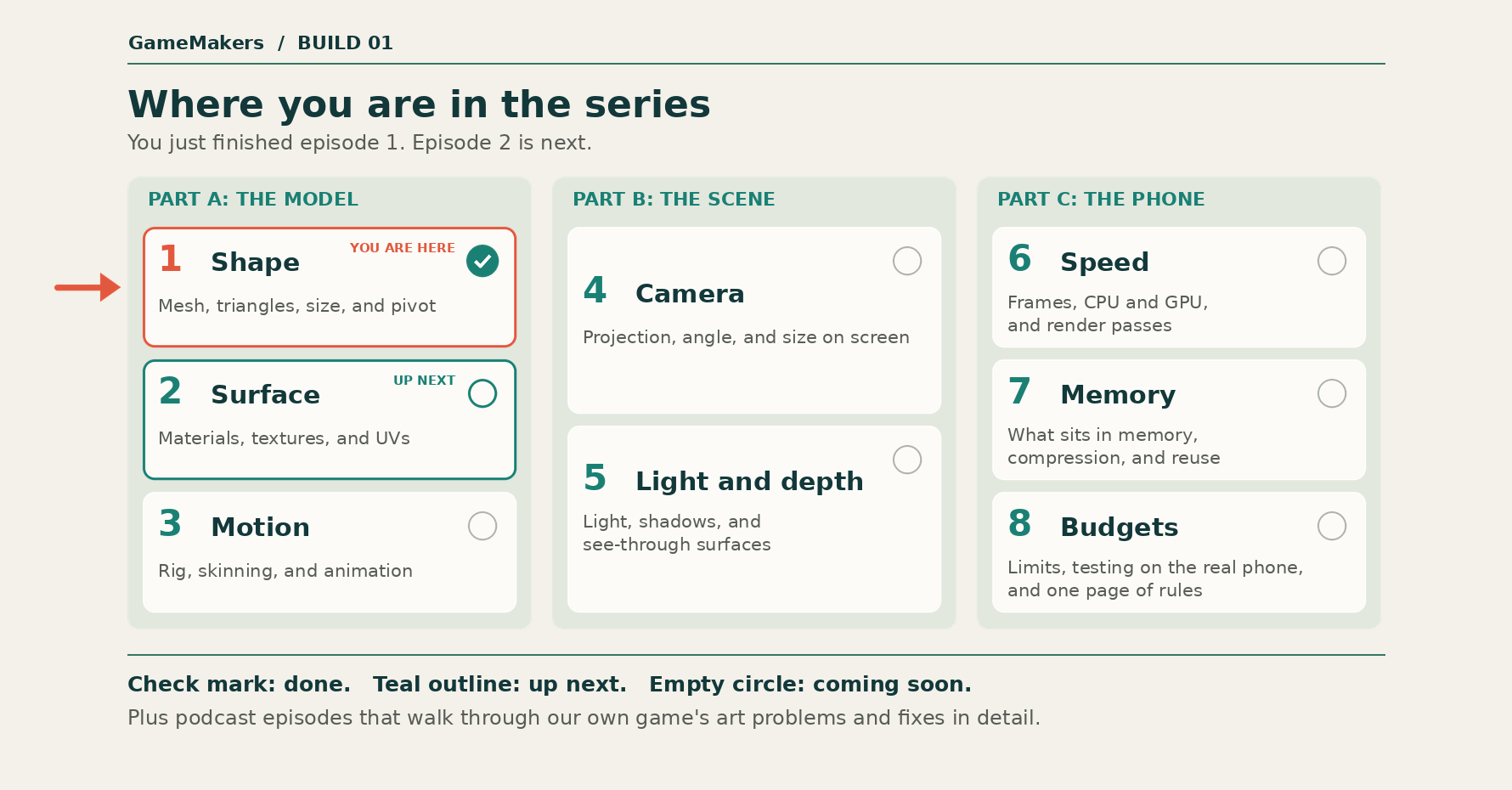
Thanks for reading GameMakers. Episode 2 is coming soon.